Onboarding Tours
Overview
SpeedPy includes a guided onboarding tour system powered by Driver.js. Tours can be enabled or disabled via the SPEEDPY_TOURS_ENABLED setting.
SPEEDPY_TOURS_ENABLED = env.bool("SPEEDPY_TOURS_ENABLED", default=True)
When disabled, no database queries are made and no tour assets are loaded.
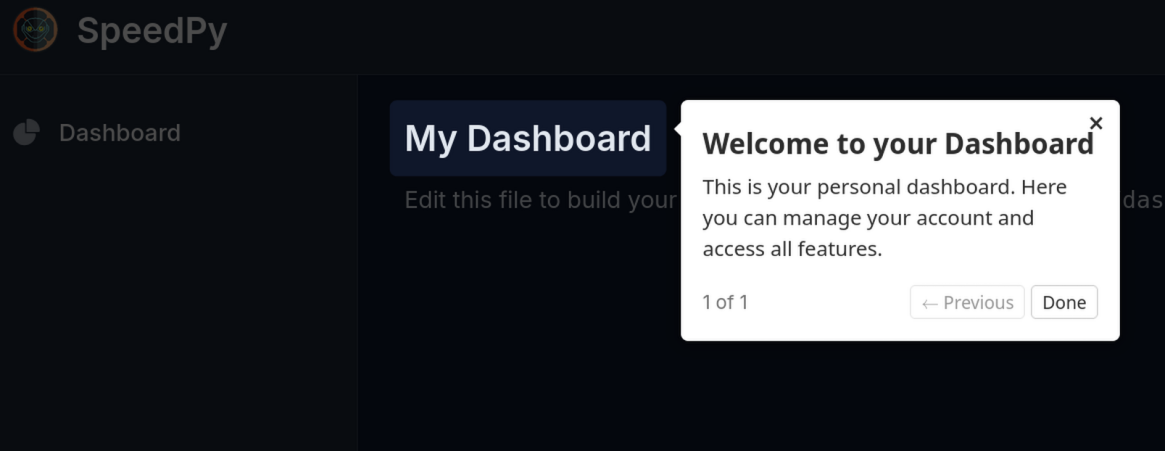
How It Works
TourMixinis added to a view's MRO — it injectstour_steps(JSON) andtour_nameinto the template context.- The
_tour.htmlpartial initialises Driver.js onDOMContentLoadedand starts the tour if steps are present. - When the user completes (or dismisses) the tour, the partial POSTs to
/tour/complete/, which creates aUserTourCompletionrecord. - On subsequent visits,
TourMixindetects the existing record and passes empty steps — the tour is skipped.
Model
UserTourCompletion lives in mainapp/models/tours.py:
class UserTourCompletion(models.Model):
    user = models.ForeignKey('usermodel.User', on_delete=models.CASCADE)
    tour_name = models.CharField(max_length=100)
    completed_at = models.DateTimeField(auto_now_add=True)

    class Meta:
        unique_together = ("user", "tour_name")
The tour_name corresponds to the URL name (from urls.py) of the view where the tour runs.
Defining Tour Steps
Tour steps are defined in mainapp/tours.py as a dict keyed by URL name:
TOURS = {
    "dashboard": [
        {
            "element": "h1",
            "popover": {
                "title": "Welcome to your Dashboard",
                "description": "This is your personal dashboard. Here you can manage your account and access all features.",
            },
        },
    ],
    "team_dashboard": [
        {
            "element": "h1",
            "popover": {
                "title": "Welcome to your Team Dashboard",
                "description": "Manage your team from here. Invite members, configure settings, and track your team's activity.",
            },
        },
    ],
}
Each step is a dict with:
element— CSS selector for the element to highlight (e.g."#my-button",".sidebar")popover— object withtitleanddescriptionstrings
See the Driver.js documentation for the full list of step options.
Adding a Tour to a View
- Add a key to
TOURSinmainapp/tours.pywhose name matches the view's URLname. - Add
TourMixinas the first class in the view's MRO:
from mainapp.views.mixins import TourMixin

class MyView(TourMixin, LoginRequiredMixin, TemplateView):
    template_name = "mainapp/my_view.html"
TourMixin looks up request.resolver_match.url_name to find the matching steps, so the URL name must exactly match the key in TOURS.
URL
| URL | Method | Auth | Response |
|---|---|---|---|
/tour/complete/ | POST | login required | {"ok": true} |
The view records the tour as completed for the current user and tour name (passed in the request body).
Disabling Tours
Set SPEEDPY_TOURS_ENABLED=False in your environment. TourMixin will return empty steps immediately — no database queries are made and no Driver.js assets are loaded.